
Databricks Unity Catalog Migration, Done in Weeks Not Years
Author: Matthieu Lépicier, Technical Lead, Data SEA Consulting
On time, invisible, done — that's what a Unity Catalog migration should feel like.
If you're new to it: Unity Catalog is Databricks' governance layer. It is one place to control who can access which data, trace where that data came from and where it goes, as well as audit how it's used, across every workspace you run. It governs more than tables. Files, ML models, functions, and the assets AI applications depend on all sit under the same permissions and lineage. That's why it's the default for new Databricks workspaces, and why it's the strongest governance option out there.
Here's how the story usually goes. Leadership decides the company needs to be ready for AI: agents, assistants, natural-language questions over company data. On Databricks, the governance that makes those tools safe to put in front of users runs on Unity Catalog. So the migration gets green-lit and a cutover date goes on the roadmap. Two years later, it's still mid-flight: half the pipelines live in the old world and half in the new, the AI roadmap is parked behind it, and the management team is screaming bloody murder.
Unity Catalog migrations have a reputation for turning into multi-year slogs. That reputation is earned — but not for the reason most teams expect.
Key Takeaways
The hard part of a Unity Catalog migration isn't the namespace change — it's the workflows, integrations, and assumptions built on top of Hive Metastore
An idempotent, API-driven process makes a shadow build possible: build and validate the new environment while the legacy system keeps running
Four named risk categories — non-replayable pipelines, shared credentials, big-bang cutover requirements, and feature disparities — account for most migrations that spiral
What Makes Unity Catalog Migration Harder Than It Looks
Most teams that stall out on a Unity Catalog migration didn't get stuck on the namespace change. They got stuck on everything built on top of Hive Metastore over the years — workflows, integrations, and assumptions nobody wrote down.
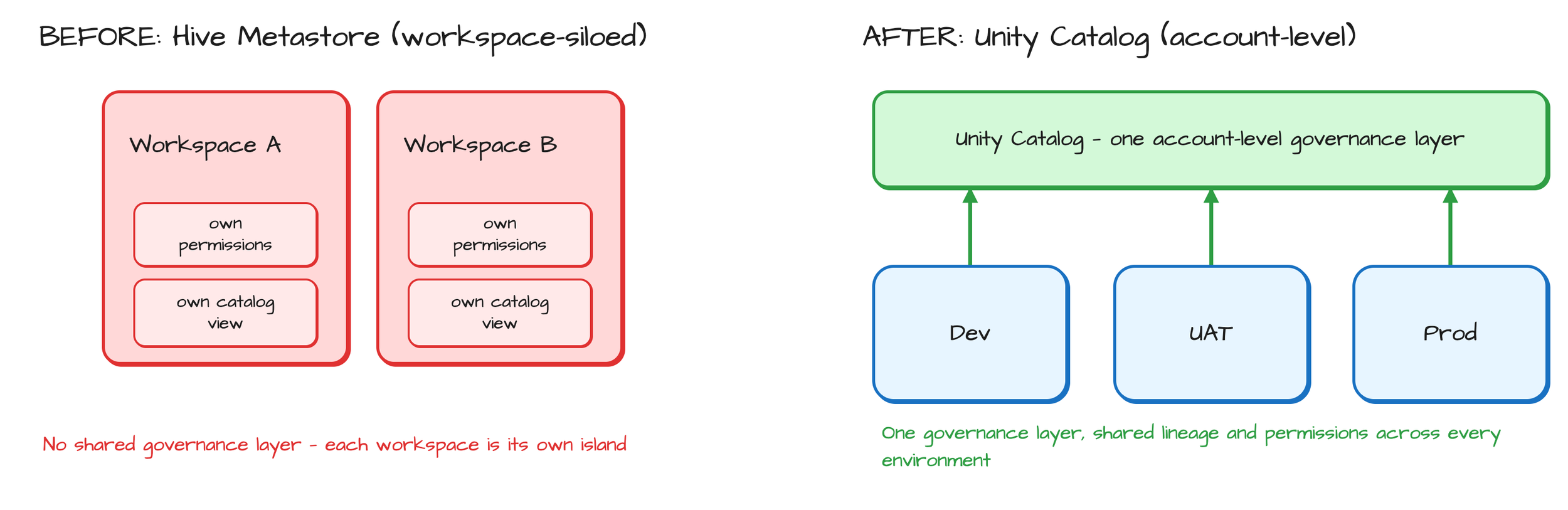
On paper, Hive Metastore to Unity Catalog looks like a naming exercise: schema.table becomes catalog.schema.table. In practice, it's a governance-model change. Hive Metastore is workspace-siloed — every workspace holds its own permissions and its own view of what exists. Unity Catalog is account-level: one governance layer spanning every workspace, environment, and region you run.
Databricks' engineering team names the same governance gap. A legacy, per-workspace Hive Metastore leaves teams "relying on... duplicated policies and fragmented visibility across workspace environments." More bluntly: Hive Metastore "fundamentally lacks lineage tracking, multi-workspace governance and modern security controls" (Databricks Blog, Oct. 2025). That's the exact governance gap Unity Catalog exists to close.
There's no honest single-number timeline to put here, and we won't invent one. Databricks' own migration guidance says duration depends on workspace size, table count, and workload complexity, and recommends scoping it with a small proof-of-concept on one real workload rather than assuming a fixed number of weeks. That's also the right instinct: the risks below are what actually drive timeline, not the catalog swap itself.
The "years" version of this project isn't caused by the catalog structure itself. It's caused by treating each risk as a surprise to solve for the first time, on a live system, under a deadline. A repeatable process solves each of those risks once, before they're urgent, instead of rediscovering them project by project.
The Core Idea: A Programmatic, Idempotent Migration
Every step in a well-run Unity Catalog migration is a script that can be re-run safely. That single property — idempotency — is what turns a migration from a one-shot risk into a controlled process.
Thankfully, this is not a lesson we had to learn the hard way. Years of building on Databricks gave the Data SEA team a firm, opinionated view of how platform work should be engineered: as code, repeatable, and safe to re-run. So when we took on our first Unity Catalog migrations, we built them around idempotency from day one — and that's why they've run smoothly.
Idempotent means what it sounds like: running a step twice never duplicates a job, doubles a secret, or corrupts a table. That matters because migrations rarely go perfectly on the first pass. A validation check fails somewhere — a job definition doesn't translate cleanly, a secret scope collides — and the fix is to re-run that step, not restart the migration.
Every operation runs through the Databricks REST API directly. No point-and-click console work, no manual export that only the person who did it can explain. Every action is a script, every script is auditable, and every result is something we can walk a client through and account for.
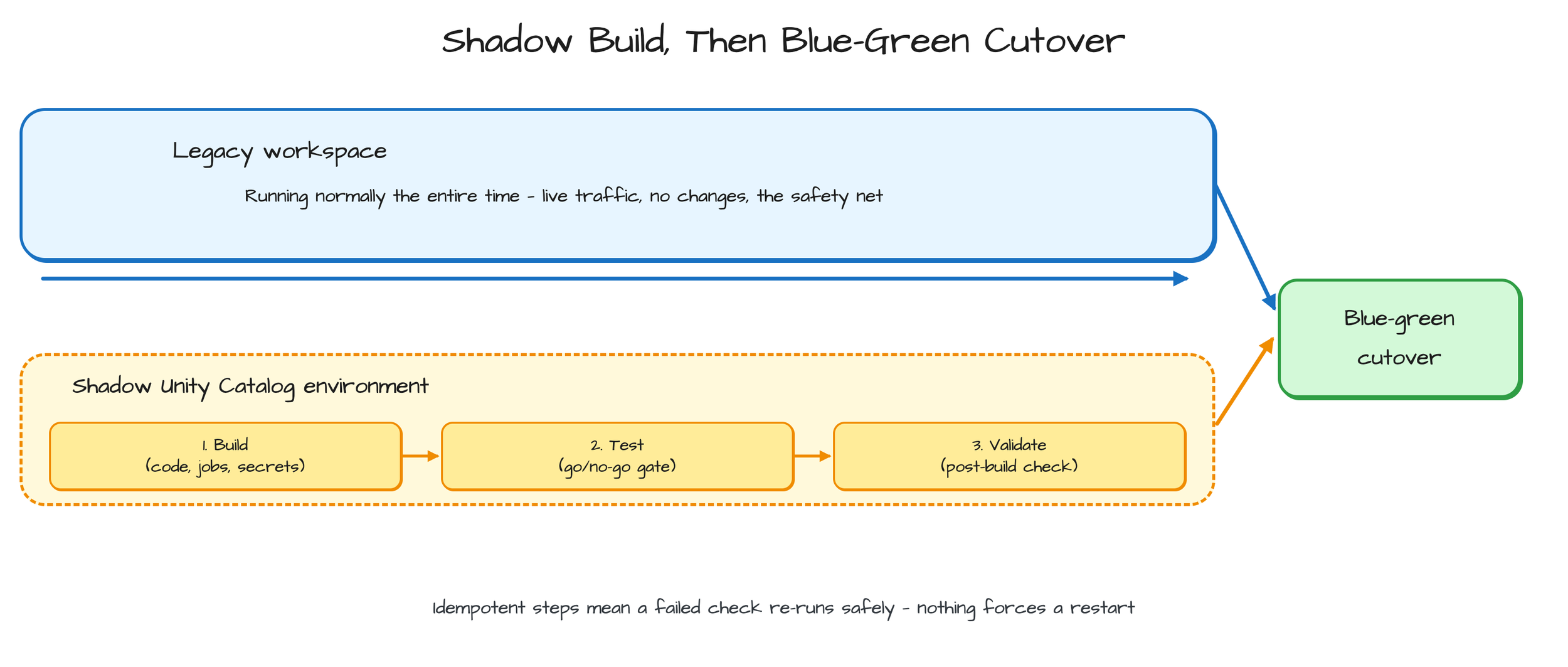
That combination — idempotent, API-driven, scripted — is what makes a shadow build possible. Building on the Lakehouse Landing Zone's dev/UAT/prod pattern, the target Unity Catalog environment gets built out and populated in full — code, jobs, secrets, etc. — while the legacy workspace keeps running untouched. Nothing has to happen once, in a hurry, under pressure, because the new environment isn't live yet.
Contrast that with what most teams default to: a mix of manual console clicks and one-off scripts nobody intends to run twice. Skip a step, and there's no clean way to tell. That's the pattern that turns a migration into a multi-month escalation — not the technology, the process.
Shadow Deploy, Then Blue-Green Cutover
The pattern in one sentence: build the new environment fully, in parallel, validate it, then switch over — instead of migrating a live system in place.
Shadow build. The Unity Catalog target gets stood up and populated while the legacy workspace keeps operating exactly as it did before. Code gets migrated, job definitions get translated into the new environment's format, secrets get provisioned etc. None of it is consumer-facing yet, because the legacy system is still the one doing the work.
Validation gates. Before and after the shadow build, we run checks against both environments — confirming the target has what it needs, and confirming what got built actually matches what should be there. Problems get caught here, while the legacy system is still running as a safety net, not after cutover when there's nothing left to fall back to.
Blue-green cutover. Once the shadow environment passes validation, usage moves over in a controlled switch rather than an in-place rewrite. Because every step is idempotent, a failed cutover step can be re-run without collateral damage — it doesn't mean starting the migration over.
This structure matters most for pipelines that can't simply be replayed in the new environment (more on that next). A shadow build gives room to stage a one-time historical merge before cutover — reconstructing the exact state a pipeline needs — instead of patching live data mid-migration while people are waiting on it.
This is also where we've seen the biggest real-world impact. For clients that have gone through a Data SEA shadow deployment, cutover day tends to be a non-event: dashboards refresh on schedule, jobs land on time, and the people using the data often don't realize anything changed until we tell them the migration is done. Because the legacy system never goes dark, there's no long change freeze either — teams keep shipping while the new environment comes together.
The Failure Modes That Turn a Migration into a Multi-Year Project
Four risk categories account for most migrations that spiral. Naming them upfront is the point — vague risk is what turns into months of firefighting; named risk is something you plan around.
Non-replayable pipelines. Month-to-date aggregations, SCD-2 dimension tables, and stateful incremental loads can't simply be re-run in the new environment — replaying them produces wrong numbers or duplicate history. The shadow build is what makes a mounted-forward, one-time historical merge possible.
External rate limits. Migrating secrets as-is can put dev, uat, and prod on the same credentials against the same external quota. That's a constraint the legacy single-environment setup never surfaced — only one environment was ever calling that system at a time.
Big-bang cutover requirements. Some source connectors simply can't run in parallel with the legacy system. There's no gradual option. This is exactly the case a validated blue-green cutover is built for: everything staged (into the mount) and checked before the one moment it has to switch, rather than a slow in-place migration with no safe middle state.
Feature disparities. Some legacy capabilities don't carry over cleanly. The legacy MLflow Workspace Model Registry is the clearest example. Databricks disabled it outright for new accounts on Unity Catalog starting in April 2024. Its replacement, Models in Unity Catalog, isn't a drop-in swap — it means workflow and permission changes, not just a config update (Databricks documentation). Cross-region moves compound this further, since not every feature is available or as mature in every region.
None of these four are exotic. They show up in nearly every migration past a certain size. The difference between a smooth migration and a stalled one is whether they're identified during planning or discovered mid-cutover. We've met all four in client work, and each one now has a standard answer in our process rather than a fresh investigation.
What "Smooth" Actually Means in Practice
Smooth doesn't mean fast for its own sake. It means predictable — a client can tell you when it'll be done and believe it, because every risk that could blow up the timeline was already named and staged before cutover, not discovered during it.
That's the standard Data SEA holds itself to on every migration: a date we commit to at the start, and a cutover that lands on it without surprises.
Validation checkpoints before and after the shadow build function as go/no-go gates. Nothing moves to cutover with an open question attached — issues surface weeks before cutover, not during it.
Maybe the biggest thing this removes: the legacy system stays fully operational for the entire build. There's no "we're mid-migration and something's on fire" window, because nothing has actually moved until the validated switch happens. That's the difference between a migration a client can plan around and one that becomes the six-month fire drill nobody budgeted for.
Getting There
The risk in a Unity Catalog migration was never the namespace change. It's the pipelines that can't simply replay, the secrets that weren't built for three concurrent environments, and the cutover windows that only work once. Naming those risks and solving them with an idempotent, API-driven process turns an open-ended migration into a sequence anyone can follow: build the shadow environment, validate it, cut over.
If you're mid-migration already, or still deciding whether Hive Metastore's day-to-day friction justifies the move, talk to Data SEA about a migration readiness conversation before you pick a start date.
For a closer look at the environment your migration lands on, see the target architecture in practice.
Matthieu Lépicier
About the author

Matthieu Lépicier
Technical Lead
Matthieu Lépicier is a Technical Lead at Data SEA Consulting in Toronto, where he delivers technical strategy and architecture for several of the firm's clients and its internal codebases, from infrastructure and DevOps to apps and AI tooling. He has directed large-scale lakehouse migrations onto Data SEA's in-house framework, moved teams to data mesh, and set the governance standards that align client platforms with PIPEDA and SOC 2. Before joining Data SEA, Matthieu worked in data science and operations research at SAS, Danone and Mars. He holds an MSc in Management and Business Analytics from Ivey Business School and a Master of Engineering in Operations Research from the University of Technology of Troyes, France.